Never Miss an LSA or FFE Inspection. Stay SOLAS-Ready.
Track every life-saving appliance and fire-fighting item on board — inspections, service dates and expiries — in one fully offline app. Import your existing register from Excel in seconds.
The 3 problems every Safety Officer knows by heart
MSM was built around real daily pain — not around a feature list.
⏱
An overdue inspection found during a PSC visit
A liferaft service overrun, an expired EPIRB battery, a pyrotechnic past its date — one lapsed item is a deficiency, a delay, and potential detention.
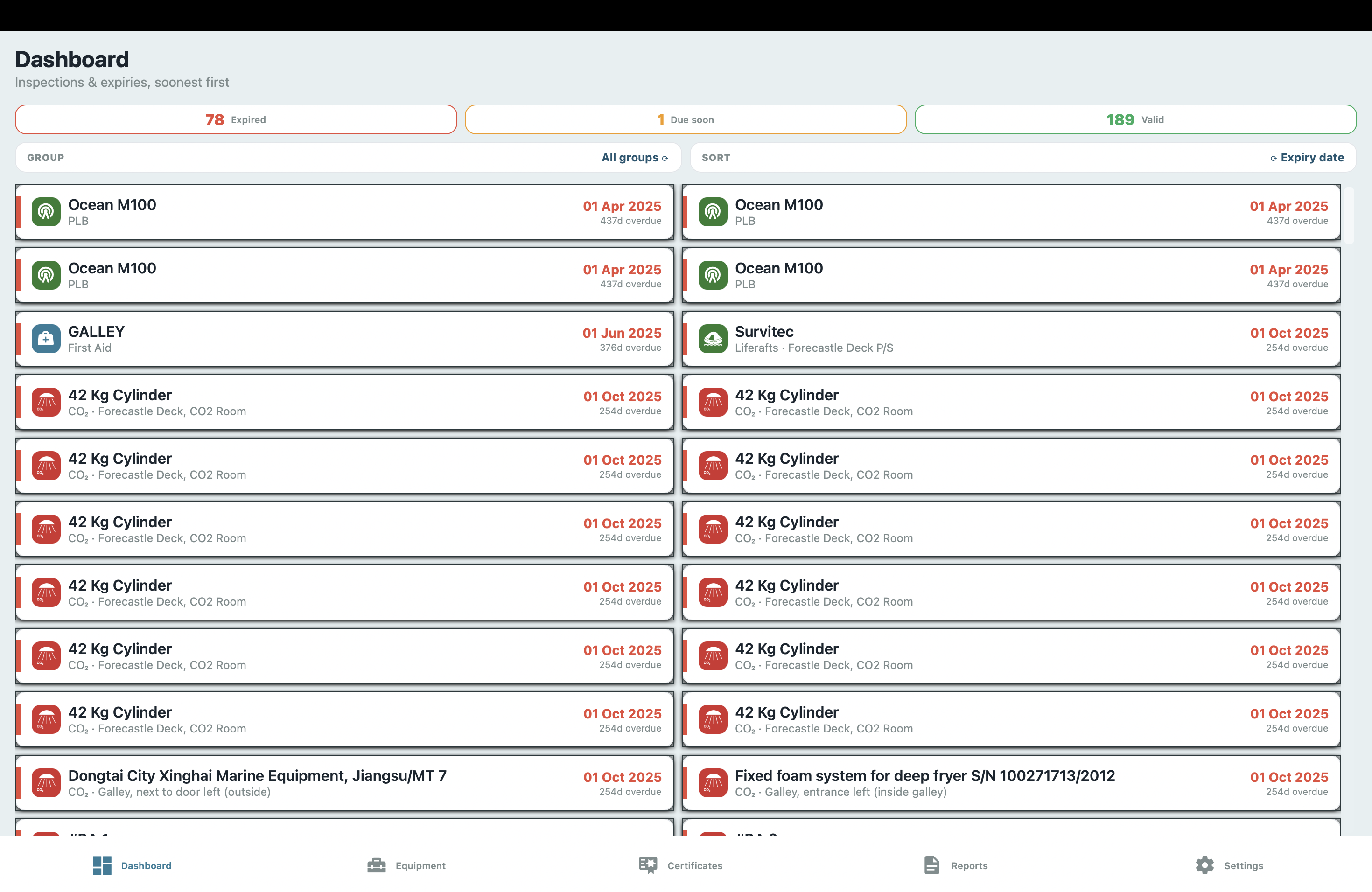
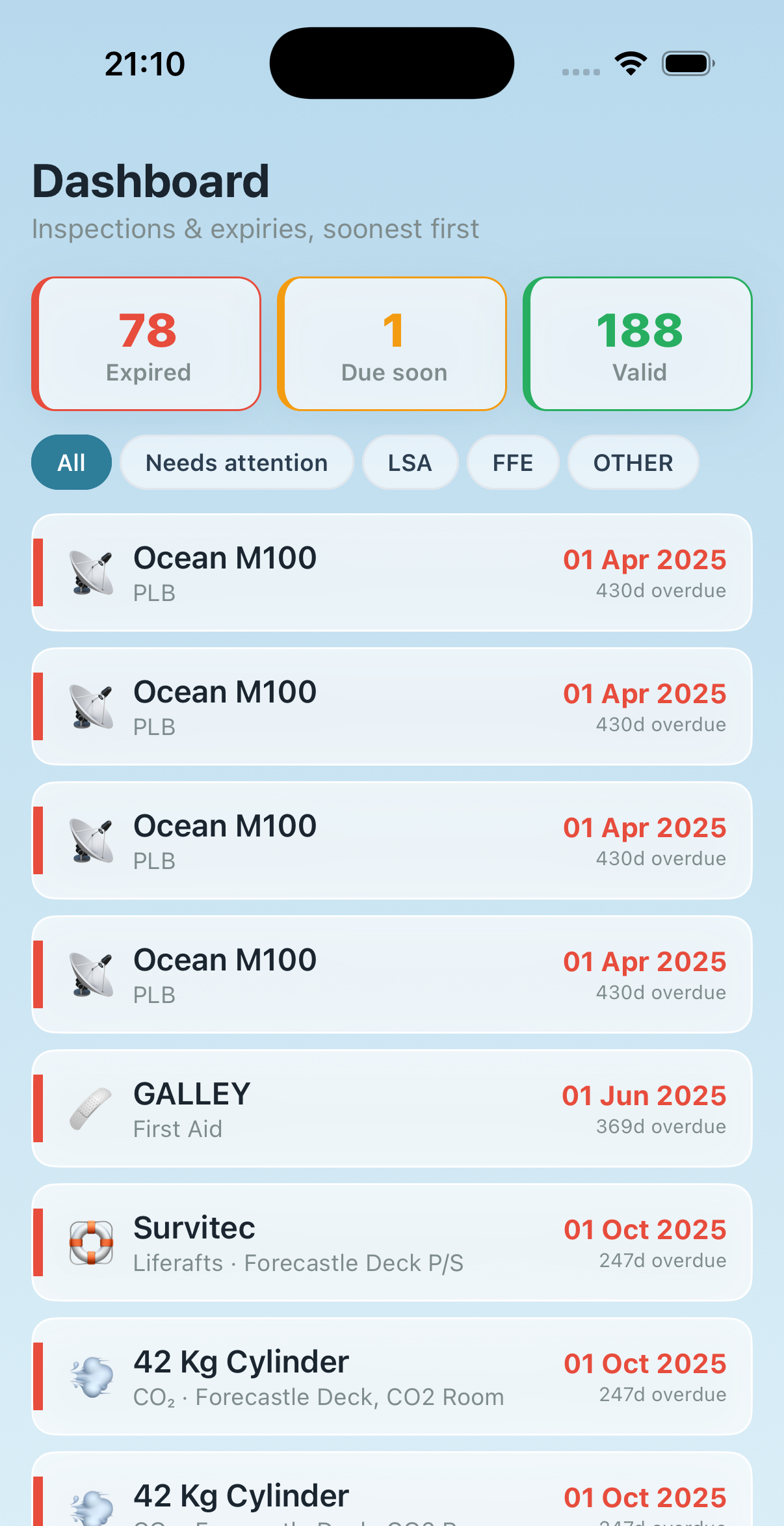
Every item is colour-coded by status — expired, due soon (≤ 60 days), or valid — and sorted soonest-first on one dashboard.
📂
Hours rebuilding the safety register by hand
Spreadsheets, photocopies and clipboards for every locker — preparing the LSA/FFE register for an inspector steals entire watches before port call.
Import your existing Excel register in one step, then export a clean PDF or XLSX register for any category — or the whole vessel — in seconds.
📡
Cloud tools fail in the middle of the ocean
VSAT is expensive and unreliable. Any tool that requires an internet connection is unusable where it matters most.
All data is stored locally on every device. MSM works 100% offline — always, everywhere, without exception.
Features
Everything the safety officer needs, in one app
One offline app covering the full LSA & FFE register — from Excel import to inspection reminders and PSC-ready reports.
Equipment Register
Every appliance organised into 23 categories across LSA, FFE and Other — type, serial/ID, position on the vessel, quantity, dates and remarks. Add headings of your own for whatever else you walk round: emergency lighting, escape routes, alarm panels. Search and edit any item.
23 categories, plus your own · LSA · FFE · Other · per-item detail
Inspection Dashboard
All items with a date, sorted soonest-first, so the most urgent work is always on top. Status colours: expired, due soon (≤ 60 days), valid. Filter by LSA / FFE / Other.
Soonest-first · colour-coded · attention filter
Excel Import
Load your existing LSA / FFE Inventories workbook in one step. Each worksheet maps to a category automatically; dates and serials are converted for you, with a preview before saving.
XLSX import · auto category mapping · preview
Reports, Print & Export
Pick any mix of categories and generate a clean safety register — landscape PDF (each item on one line) or XLSX — with type, serial, position, dates and status. Print straight to AirPrint, or export a ZIP bundling the PDF with every attached photo.
PDF · XLSX · Print · ZIP with photos
Certificates
Manage group certificates — one document (e.g. a liferaft service certificate) linked to the many items it covers. Each carries its own expiry status and surfaces in your due-soon view alongside the equipment.
Group certificates · linked items · expiry tracking
Photos & Documents
Attach up to four photos or documents to any item — service reports, nameplates, PDFs — captured from the camera, library or files, and stored on the device with the item.
Camera · library · PDF · up to 4 per item
BA Compressor Log
Optional module for the breathing-air compressor: track up to three units, log each charging run by time into an accumulated running-time counter, and record dated maintenance, service and inspection events.
Up to 3 units · running-time counter · maintenance log
QR Inspections & Audit Trail
Print a unique QR label for every item. Scanning it opens that exact record and starts the weekly or monthly checklist — 30 ready-made lists across the categories. Each result is signed by name and stamped with the exact date and time, with comments and evidence photos. A signed record can never be edited or deleted: a correction is a new inspection, and both stay on file.
QR scan · PASS / FAIL per line · signed & timestamped · append-only
Your Own Checks
Your SMS words its checks its own way, and inspects things nobody else asks about. Add headings of your own — emergency lighting, escape routes, alarm panels — and rewrite any checklist into your own wording: re-word a line, re-order them, delete what your ship does not have, add what your SMS requires. An Officer does it on board, in minutes, with no new release from us. Editing never reaches the past: every signed inspection keeps its own copy of the questions it was signed against, so last month's records read exactly as they were signed.
Your headings · your wording · edited on board · history untouched
Defects & Rectification
A failed check raises a defect against that item and it stays outstanding — on the dashboard, in a filterable LSA / FFE list, and on the item itself — until somebody records the rectification, which is signed and stamped in its turn. Nothing is quietly cleared.
Raised on failure · stays open · signed rectification
Crew Accounts & Roles
The Master issues each crew member an account — a name and an 8-digit PIN — and approves their device. Three roles: Crew records inspections, Officer also clears defects, Master also issues accounts. Roles are enforced by the server, not by the app, so a signature means something.
The register and the inspection trail keep themselves in step across every approved device on the vessel — no buttons to press. Records are append-only, so two officers inspecting on two phones cannot overwrite each other. Evidence photos are downscaled and queued until the ship has a connection worth spending, so a satellite link is never surprised by them.
Live sync · offline-first · no conflicts · Wi-Fi-only photo upload
Backup & Restore
Export a single .msm backup holding the entire register — items, certificates, compressor logs, vessel info and every attached file embedded inside. Restore it on a new device or after a reinstall, no cloud required.
One-file .msm · files included · device-to-device
Built-in Manual
An in-app guide with indicative SOLAS / FSS inspection intervals for each category and regulatory references — so the next service date is never a guess.
Inspection intervals · SOLAS / FSS references
One Vessel · One Licence · Every Device
One licence. The whole crew.
€99 per year, per vessel. Licensed to the ship by its IMO number — not per person and not per device. Every officer and every handset on board is covered by the one licence.
How a vessel gets set up
Buy one licence for the ship, then put the crew on it. There are no per-seat prices to count and nothing for a crew member to purchase — a deckhand joining in Singapore installs a free app and is working in a minute.
1
Buy the vessel licence — €99 / year for the ship. You receive a licence key.
2
The first device enters the vessel's IMO number and becomes the Master. Activate the key there — it attaches to the ship, not to the phone.
3
The Master issues each crew member an account — a name and an 8-digit PIN — and approves their device.
4
Every approved device has full access and shares one register. Nobody else buys anything.
60 days free on every install, no key and no card — long enough to run a full monthly cycle before deciding.
iPhone & iPad
iOS & iPadOS
Android
Phone & Tablet
Windows & Mac
In the browser
Private by design: the register holds equipment data and the names of the crew who signed each inspection — nothing else. Every vessel sees only its own data, isolated under its IMO account, and the app works fully offline whether or not you ever switch sync on.
Regulatory Framework
Mapped to the rules your vessel is inspected against
MSM organises your LSA and FFE register around the conventions and codes that govern shipboard safety equipment. Indicative intervals in the app must always be verified against your flag, class and the makers' instructions.
SOLAS Ch III · LSA Code
Life-Saving Appliances
Liferafts, lifejackets, immersion suits, lifebuoys, EPIRB, SART, pyrotechnics, MOB boat and launching appliances — with their operational-readiness and servicing dates.
SOLAS Ch II-2 · FSS Code
Fire-Fighting Equipment
Extinguishers, fixed CO₂, detection, dampers, hydrants and hoses, BA sets and EEBD — tracked with inspection, service and hydrostatic-test dates.
MSC.1/Circ.1432 (rev 1622)
Maintenance of Fire Systems
The maintenance, testing and inspection schedule for fire-protection systems and appliances — reflected in the app's indicative intervals.
Res. MSC.402(96)
Lifeboats & Launching Gear
Maintenance, thorough examination, operational testing and overhaul of lifeboats, rescue boats, launching appliances and release gear.
ISM Code
Safety Management System
Keeps a tidy, exportable record of equipment status and monthly checks to support your SMS documentation and internal audits.
Port State Control
Inspection-Ready Reports
Produce a clean PDF or XLSX register — per category or whole vessel — formatted for the inspector, in seconds.
Equipment Coverage
23 categories. LSA, FFE and more.
Every locker on board — life-saving, fire-fighting and supporting equipment — organised into ready-made categories with inspection and expiry tracking.
Life-Saving Appliances (LSA)
Liferafts & HRU
Lifebuoys
Lifejackets
Immersion Suits
Inflatable Lifejackets
MOB Boat / Davit
PLBs
Harnesses
GMDSS / SART / Pyro
Fire-Fighting Equipment (FFE / FIFI)
Fire Extinguishers
Fire Dampers
Fire Vents
Hydrants / Fireboxes
Fixed CO₂
FIFI Outfit & BA Sets
BA Bottle Pressure
EEBD
Fire Detectors
Other Safety Equipment
Eye Wash Stations
First Aid Kits
Chemical Suits
Gas Detection
SOPEP Locker
Each item is colour-coded by status: Expired · Due soon (≤ 60 days) · Valid
23
Equipment categories
3
Groups — LSA · FFE · Other
100%
Offline — no server, no internet
2
Export formats — PDF & XLSX
3
Platforms — one shared register
Download
One app. Any device you want on board.
Marine Safety Manager is a cross-platform application — the same features, the same register, on whichever device you choose to use. Available on the App Store for iPhone and iPad, on Google Play for Android — and in any browser, which is how it runs on a Windows machine, a Mac or the bridge PC, with nothing to install.
Marine Safety Manager is on the App Store for iPhone and iPad, on Google Play for Android, and runs in any browser — on Windows, on a Mac, or on the bridge PC. Keep your LSA & FFE register inspection-ready, all year round.


 Liferafts & HRU
 Lifebuoys
 Lifejackets
 Immersion Suits
 Inflatable Lifejackets
 PLBs
PLBs Harnesses
 GMDSS / SART / Pyro
 Fire Extinguishers
 Fire Dampers
 Fire Vents
 Hydrants / Fireboxes
 Fixed CO₂
 FIFI Outfit & BA Sets
 EEBD
EEBD Fire Detectors
 Eye Wash Stations
 First Aid Kits
 Chemical Suits
 Gas Detection
 SOPEP Locker